 Download ASiC Signer (ASiC-E XAdES eIDAS) (Free 30-Day Trial)
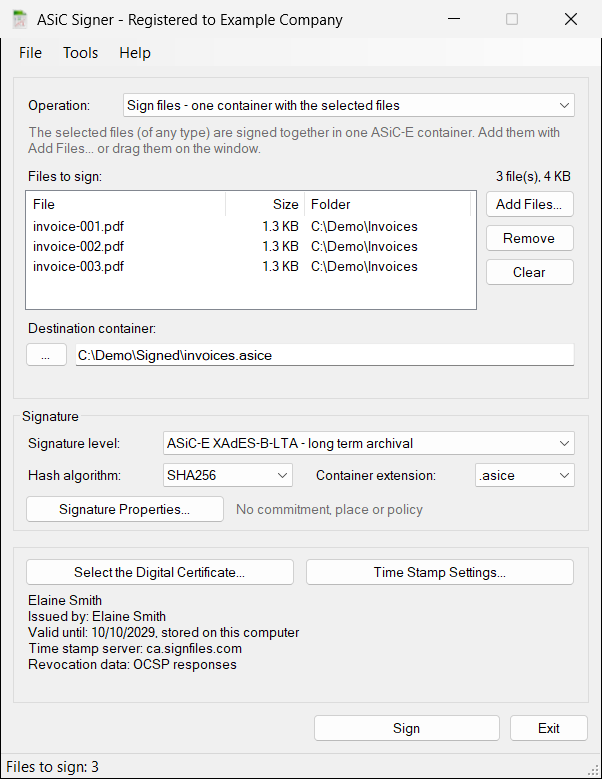
ASiC Signer (ASiC-E XAdES eIDAS) is a Windows application that digitally signs files of any type (PDF, Word, images, XML, scans, archives) with X.509 certificates and saves them, together with the signature, in ASiC-E containers (Associated Signature Containers, extended, ETSI EN 319 162-1). The signature inside the container is a XAdES signature (ETSI EN 319 132-1, baseline levels B-B, B-T, B-LT and B-LTA), the format used for advanced and qualified electronic signatures under the eIDAS Regulation (EU) No 910/2014. The result is a single .asice file that holds the signed files and their signatures, and that can be stored, sent and verified as one unit. You can sign selected files or a complete folder in one operation, from the program window or automatically from the command line, without purchasing any additional software.
Lifetime license from 19 EUR – Free 30-day trial – 60 day money back guarantee. See prices and buy.
ASiC-E and the eIDAS Regulation (EU) No 910/2014
ASiC is the European standard container for electronic signatures. An ASiC-E (extended) container is a ZIP file with the extension .asice that contains the signed files, the signature files (META-INF/signatures.xml) and a manifest. Because the files and their signatures travel together, the container is the natural format for sending a set of documents, for submitting a tender or a file to a public administration, and for archiving. The ASiC container is one of the formats referred to by Commission Implementing Decision (EU) 2015/1506 on the formats of advanced electronic signatures and seals, together with XAdES, CAdES and PAdES, and it is used by public administration, e-procurement and e-justice systems across the European Union (for example, the DigiDoc containers of Estonia). Check the requirements of the receiving system before you start.
The signatures created by ASiC Signer follow the ASiC and XAdES baseline profiles of ETSI. They can be verified with the validation tool of the European Commission (DSS – eSignature validation) and with other eIDAS-compliant validators. The validator reports the container type, the signature format, the signer’s certificate, the time of the signature or of the time stamp, the revocation status and, based on the EU Trusted Lists, whether the certificate is qualified and whether its private key is stored on a qualified signature creation device (QSCD).
 Qualified certificates and QSCD – ASiC Signer signs with qualified certificates whose private key is stored on a QSCD, such as a smart card or a USB token (for example SafeNet eToken). The private key never leaves the device: the signature is created inside it. A signature created with a qualified certificate on a QSCD is a qualified electronic signature (QES). According to Article 25 of the eIDAS Regulation, a qualified electronic signature has the equivalent legal effect of a handwritten signature and is recognised in all the Member States of the European Union. Qualified certificates for electronic seals, stored on a QSCD, are used in the same way: according to Article 35, a qualified electronic seal enjoys the presumption of the integrity of the data and of the correctness of the origin of the data to which it is linked.
The qualification level of a signature is given by the certificate and by the device, not by the software. ASiC Signer creates the signature in the format that the validators expect. For a qualified electronic signature or seal, use a qualified certificate on a QSCD issued by a qualified trust service provider. Advanced electronic signatures can be created with any valid X.509 certificate, including certificates stored in the Windows certificate store or in PFX files.
eIDAS 2 (Regulation (EU) 2024/1183) and the Long-Term Preservation of Signed Documents
eIDAS 2, Regulation (EU) 2024/1183 of 11 April 2024 that entered into force on 20 May 2024, amends the Regulation (EU) No 910/2014 and creates the European Digital Identity Framework. Besides the European Digital Identity Wallets, it extends the list of the trust services with new qualified services, among them the qualified electronic archiving services, and it keeps the rules for the electronic signatures, seals and time stamps. The Regulation (EU) No 910/2014 already provides for the qualified preservation service for qualified electronic signatures (Article 34), which extends the trustworthiness of a signature beyond its technological validity period. A signature is only useful if it can still be verified after many years, when the certificate of the signer has expired, the servers of the certification authority are no longer online and the algorithms have aged. This is the problem of the long-term preservation.
Long-term validation and archiving with ASiC Signer – the XAdES signature inside the ASiC-E container has four baseline levels, and the last two are made for the long-term storage of signed documents:
- XAdES-B-LT stores in the signature the certificates and the revocation data (OCSP responses or CRLs) of the signer, together with a trusted time stamp, so the signature can be verified even after the certificate expires or the issuer is no longer available.
- XAdES-B-LTA adds an archive time stamp that protects the whole evidence (signature, time stamp, certificates and revocation data) with a time stamp of a time stamp authority. When the cryptographic protection must be renewed, the Extend operation of ASiC Signer adds a new archive time stamp to the container, and you can run it on a whole folder of archived containers, for example every year with the Windows Task Scheduler, before the certificate of the time stamp authority expires.
The time stamps can be issued by any server that follows RFC 3161, including the servers of qualified trust service providers: an eIDAS qualified electronic time stamp enjoys, according to Article 41 of the eIDAS Regulation, the presumption of the accuracy of the date and the time it indicates and of the integrity of the data to which they are bound.
The information about the eIDAS Regulations on this page is a simplified explanation, not legal advice.
 We provide eIDAS Qualified Timestamps issued by a Qualified Trust Service Provider (QTSP) listed in the European Union Trusted Lists (EUTL) under the eIDAS Regulation. If you need eIDAS Qualified Timestamps with full legal effect across the EU, visit our dedicated website (https://qtsa.eu).
Benefits:
– ASiC-E containers (.asice or .sce) with XAdES signatures, for files of any type (ETSI EN 319 162-1, ETSI EN 319 132-1)
– Support for eIDAS (EU Regulation 910/2014) and for the long-term preservation of the signatures: XAdES-B-LT and XAdES-B-LTA
– Archive time stamps: add a new archive time stamp to the containers you keep, one by one or for a whole folder
– Support for qualified certificates on QSCD, smart card, USB token, eToken
– Qualified time stamps: use the server of any qualified trust service provider (RFC 3161)
– Sign selected files, a folder (subfolders are kept) or each file of a folder in its own container
– Co-sign: add a second (third…) signature to an existing container
– Signatures that can be verified with the European Commission validator
– Commitment type, place of the signature and explicit signature policy
– SHA-256, SHA-384, SHA-512 support
– RSA and Elliptic Curve (ECDSA) certificates
– Bulk signing and automatic signing from the command line
– Bypass smart card/USB token PIN for automatic signing
– ASiC Viewer included
Features
XAdES Standard inside ASiC-E – ASiC Signer creates XAdES baseline signatures at four levels. Choose the level that matches the requirements of the system that receives or archives your files:
| Signature format | What it contains | Typical use |
| XAdES-B-B (basic) | The signature, the signer’s certificate and the signing time | Files exchanged between organizations, tenders, applications |
| XAdES-B-T | B-B plus a trusted time stamp | When the exact time of the signature must be proven |
| XAdES-B-LT (long term) | B-T plus the certificates and the revocation data (OCSP or CRL) | Files that must remain verifiable after the certificate expires |
| XAdES-B-LTA (long term archival) | B-LT plus an archive time stamp, that can be renewed | Archives that must remain provable for many years |
The files that you sign are stored in the container without any change, and the container has the extension .asice (or .sce).
Operations – the same program does everything that is needed to create and to maintain a set of signed containers:
- Sign files – the selected files are signed together in one container.
- Sign a folder – one container with all the files of the folder; the subfolders are kept in the container.
- Sign each file of a folder – one container for each file, for bulk signing.
- Co-sign – add a new signature to a container, or to all the containers of a folder (for example, the signature of the second party of a contract).
- Extend – add a new archive time stamp to the XAdES-B-LTA containers, or to all of them in a folder.
A container is written first in a temporary file, verified (valid, one more signature, signed by the selected certificate) and only then it replaces the destination, so a failed operation never damages an existing container.
 Certificates, Smart Cards and USB Tokens – ASiC Signer is completely PKI neutral and will work with PKI components from any vendor (this includes CAs, certificates, CRLs, smartcards, etc.). You can sign with a certificate from the Windows certificate store (smart card and USB token certificates are added to the store by the driver of the token), or with a PFX/P12 file. The certificate list shows only the certificates that can sign; the qualified certificates are marked, and the program shows the certificate provider, so you can see if the private key is stored on a device. A certificate that is not meant to sign documents is signed with a warning. RSA and Elliptic Curve (ECDSA) certificates are supported. ASiC Signer refuses to sign with an expired certificate, or with a certificate that is not valid yet, before any file is processed.
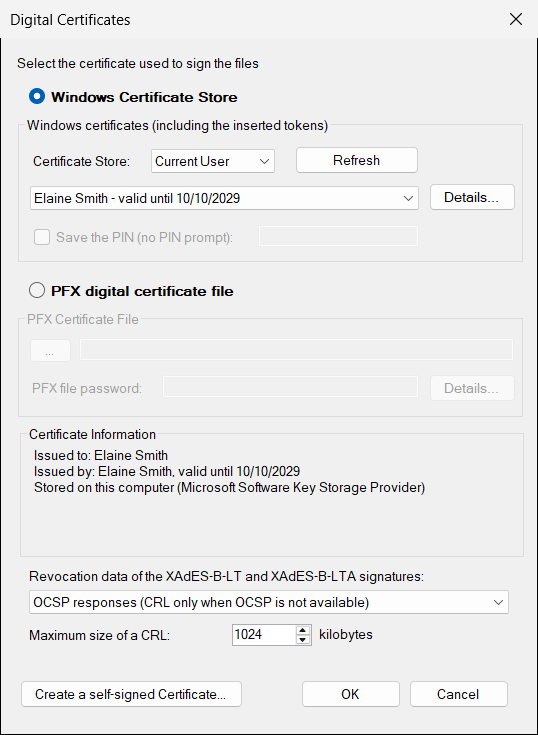
Bypass the Smart Card PIN – For automatic signing you can save the PIN of the smart card or of the USB token. It is stored encrypted and it belongs to the selected certificate. If the device rejects the PIN, ASiC Signer stops using it, so the token is not locked by repeated wrong attempts.
 Time Stamping – XAdES-B-T, XAdES-B-LT and XAdES-B-LTA signatures include a RFC 3161 time stamp, issued by a time stamp authority (TSA), and XAdES-B-LTA adds the archive time stamps. The time stamp proves that the signature existed at a given moment and that the files were not changed after that moment. You can configure the TSA address, the authentication, the policy and the use of a nonce. Only a hash is sent to the TSA: your files do not leave your computer.
 Long-Term Validation – The XAdES-B-LT and XAdES-B-LTA formats embed the certificates and the revocation data (OCSP responses or CRLs) of the signer, so the signature can be verified even after the signer’s certificate expires or is revoked and the servers of the issuer are no longer available. You choose the type of revocation data and the maximum size of a CRL.
Signature properties – You can add to the signature the commitment type (for example, proof of approval or of origin), the place where the signature was created and an explicit signature policy (an identifier, an address and the digest of the policy document), the data that some systems require.
 SHA-256, SHA-384, SHA-512 Algorithms – ASiC Signer can digitally sign files using the SHA-256, SHA-384 or SHA-512 hash algorithms. The hash algorithm of the signature and of the time stamp request are configurable.
Bulk and Automatic Signing – Select a folder and ASiC Signer signs all of it, or each file in its own container, with a progress indicator. The same operations (create, create-folder, create-each, cosign, extend and verify) can run without user intervention from the command line, from a script or from the Windows Task Scheduler. Different signature configurations (certificate, format, time stamp) can be saved in files and used for different folders. The program returns a result code (0 for success), so the process can be monitored.
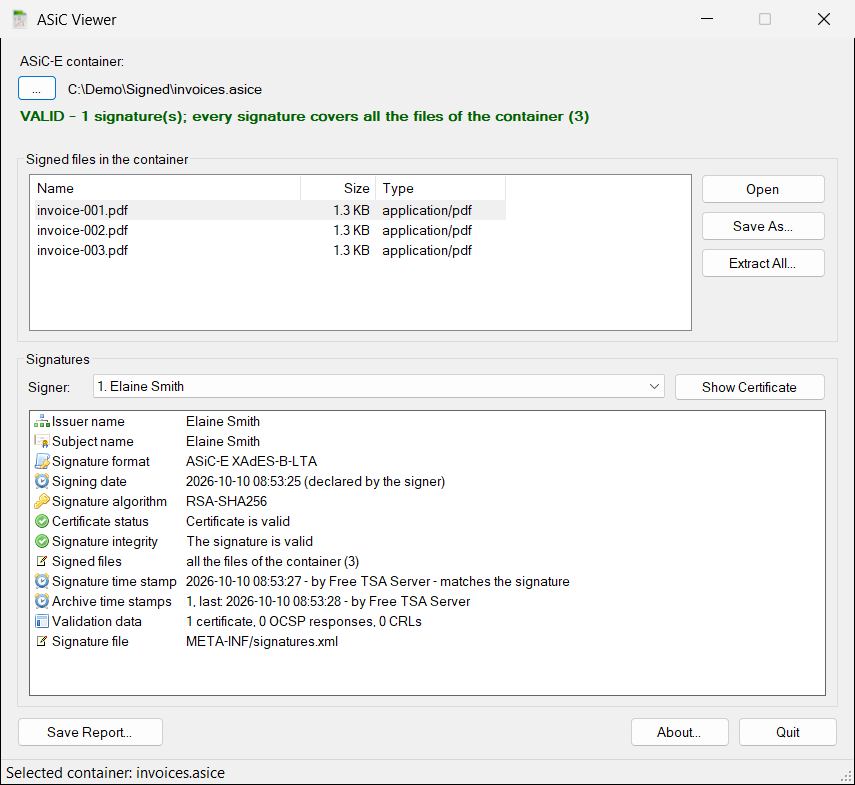
ASiC Viewer included – The setup installs ASiC Viewer together with ASiC Signer. It opens an ASiC-E container and tells you at once if all its signatures are valid and if they cover all the files. It shows the signed files (you can open, save or extract them), the signers, the signature format, the signing date, the certificate status, the signature time stamp, the archive time stamps, the validation data and the signed properties. It also tells you if a file was modified after it was signed, and it saves a text report of the verification.
Built on the eIDAS Signature Library – ASiC Signer uses the same Signature Library (SignLib) that is available to developers. You can test a signature format, a hash algorithm or a certificate in the program and then create the same signatures from your own application in C#, VB.NET or Windows PowerShell.
Where ASiC Signer Is Used
– Long-term archiving of contracts, accounting documents, minutes and other files that must remain verifiable for many years
– Tenders, applications and files submitted to public administration, e-procurement and e-justice systems that require ASiC containers
– Qualified electronic signatures and seals with a smart card or a USB token, on a set of documents sent together
– Contracts signed by several parties, with the co-sign operation
– Archives of signed containers, whose time stamps are renewed on a schedule
Before you start, check the container type, the signature format and the file extension required by the receiving system (for example ASiC-E with XAdES-B-B or XAdES-B-LT), and choose the same options in ASiC Signer.
Frequently Asked Questions
What is an ASiC-E container?
An ASiC-E container (Associated Signature Container, extended, ETSI EN 319 162-1) is a ZIP file that holds one or more signed files, their XAdES signatures and a manifest. It is used in the European Union to send, submit and archive signed files as one unit.
Does ASiC Signer create qualified electronic signatures?
ASiC Signer creates XAdES signatures in ASiC-E containers. When you sign with a qualified certificate whose private key is stored on a QSCD (a smart card or a USB token), the result is a qualified electronic signature (QES) in the sense of the eIDAS Regulation; with a qualified certificate for electronic seals the result is a qualified electronic seal. With any other valid certificate the result is an advanced electronic signature.
What is the difference between XAdES-B-LT and XAdES-B-LTA?
XAdES-B-LT stores the time stamp, the certificates and the revocation data, so the signature can be verified after the certificate expires. XAdES-B-LTA adds an archive time stamp that protects all of this evidence and that can be renewed with the Extend operation, which is the right choice for the files that you archive for many years.
How can I keep the signatures valid for many years?
Sign with XAdES-B-LTA and a time stamp server, preferably a qualified one, and extend the archived containers from time to time (for example every year, with the Windows Task Scheduler) with the Extend operation, before the certificates of the time stamp authority expire. This is the technical side of the long-term preservation; the legal effect depends on the certificates and on the services that you use.
How does eIDAS 2 change the electronic signatures?
The Regulation (EU) 2024/1183 (eIDAS 2) amends the Regulation (EU) No 910/2014, introduces the European Digital Identity Wallets and adds new qualified trust services, such as the qualified electronic archiving. The qualified electronic signatures, seals and time stamps remain based on qualified certificates and on a QSCD, and the signature formats and containers of ETSI that ASiC Signer uses remain the technical basis.
How can I check the containers?
Open the container with ASiC Viewer, included in the product, or use the verify command from the command line. For a validation according to the eIDAS rules, use the validation tool of the European Commission (DSS) or another eIDAS-compliant validator.
Can I sign with a smart card or a USB token?
Yes. Install the driver of the token, select its certificate from the Windows certificate store and, if you wish, save the PIN for automatic signing.
Can I sign many files automatically?
Yes. Select a folder, or start ASiC Signer from the command line with the operation, the source, the destination and an optional configuration file.
Are my files sent to a server?
No. The files are signed on your computer. An Internet connection is used only for the time stamp (a hash is sent to the time stamp server) and for the revocation data of the long-term formats.
Which hash algorithms are supported?
SHA-256, SHA-384 and SHA-512.
Requirements:
– A digital certificate (eIDAS qualified digital certificates, QSCD are supported)
– Microsoft .NET Framework 4.6.2 or higher
– Windows 10 or later (including Windows 11 and Windows Server 2022)
 Licensing:
The license for ASiC Signer is a lifetime license. There is no additional cost like monthly / annual fees or fees per use. When a new version is released you can continue using your purchased version as usual.
 The technical support and updates are free for 12 months after purchase. If you need help with our software, please contact us to receive prompt assistance from our technical support team. We offer free before-and-after purchase technical support for our programs. Technical support is provided by email only. Email response time is usually less than 24 hours.
 60 Day Money Back Guarantee – If you are not pleased with our software for any reason, you are entitled to our 60 day no hassle, no questions asked, money back guarantee.
Buy ASiC Signer
| License type | Price (€) |
Buy with PayPal | Buy with credit card | |
| Single License (for 1 computer) |
19 EUR Lifetime License |
 |
||
| Technical Support | The technical support is free for 12 months after purchase | |||
 If you like to pay by Bank Wire Transfer, please fill this form.
Download ASiC Signer (ASiC-E XAdES eIDAS) (Free 30-Day Trial)
(latest version: 2.2)
Useful links:
- eIDAS Signature Library for .NET
- Time Stamp Server and qtsa.eu – eIDAS Qualified Timestamps
- Digital Certificates
- XML Signer (XAdES)
- PDF Signer (PAdES)
- P7S Signer (P7M and CAdES)