 Download eIDAS Signature Library .NET with Visual Studio Sample Projects (free evaluation, all features)
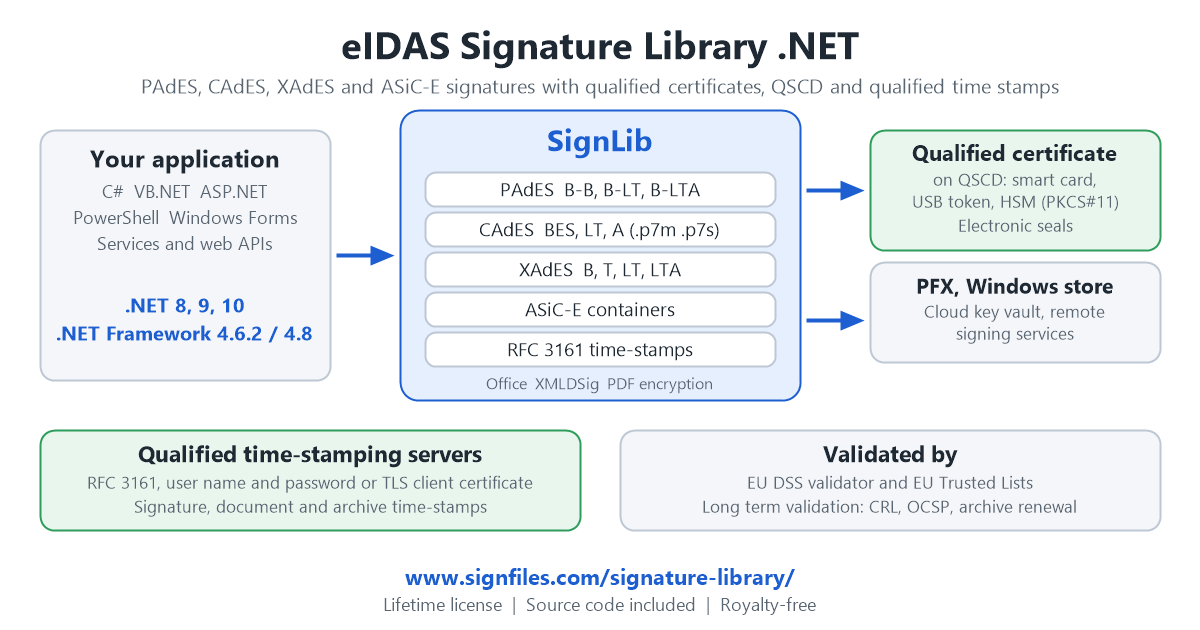
eIDAS Signature Library .NET (SignLib) is a digital signature library for .NET 8, .NET 9, .NET 10 and .NET Framework that creates and verifies eIDAS-compliant electronic signatures in C#, VB.NET, ASP.NET and PowerShell: PAdES for PDF, CAdES (.p7m, .p7s) for any file, XAdES for XML and ASiC-E containers. It signs with qualified certificates and qualified electronic seals stored on a QSCD (smart card, USB token, HSM through PKCS#11), and it works with qualified time-stamping servers (RFC 3161) for signatures that can be validated years later (PAdES-LT, PAdES-LTA, XAdES-LTA, CAdES-A).
Lifetime license 190 EUR – unlimited developers – royalty-free – full C# source code included – 60 day money back guarantee. See the license and buy.
- Code Samples

- Download the library with the Visual Studio sample projects
- eIDAS Signature Library .NET Programmer’s Manual

A .NET Digital Signature Library Built for eIDAS
Many libraries can put a signature in a PDF file. Far fewer produce the signatures that the eIDAS Regulation (EU) No 910/2014 (as amended by Regulation (EU) 2024/1183, “eIDAS 2.0”) and its ETSI standards require, and fewer still can sign with qualified certificates and qualified time stamps. A signature that must be accepted by an e-government portal, a public procurement system or a court, or that must stay valid for ten years, is not a plain PKCS#7 signature. It needs the right format, a qualified certificate on a QSCD when the law asks for a qualified electronic signature, a trusted time stamp, and the validation data that proves the signature after the certificate has expired.
eIDAS Signature Library .NET covers this chain in one assembly written in 100% managed C#. You choose the signature format and the baseline level, the certificate and the time-stamping server; the library creates a signature that European validators, such as the EU DSS validation tool, recognize and check against the EU Trusted Lists.
| What an eIDAS signature needs | How eIDAS Signature Library .NET covers it |
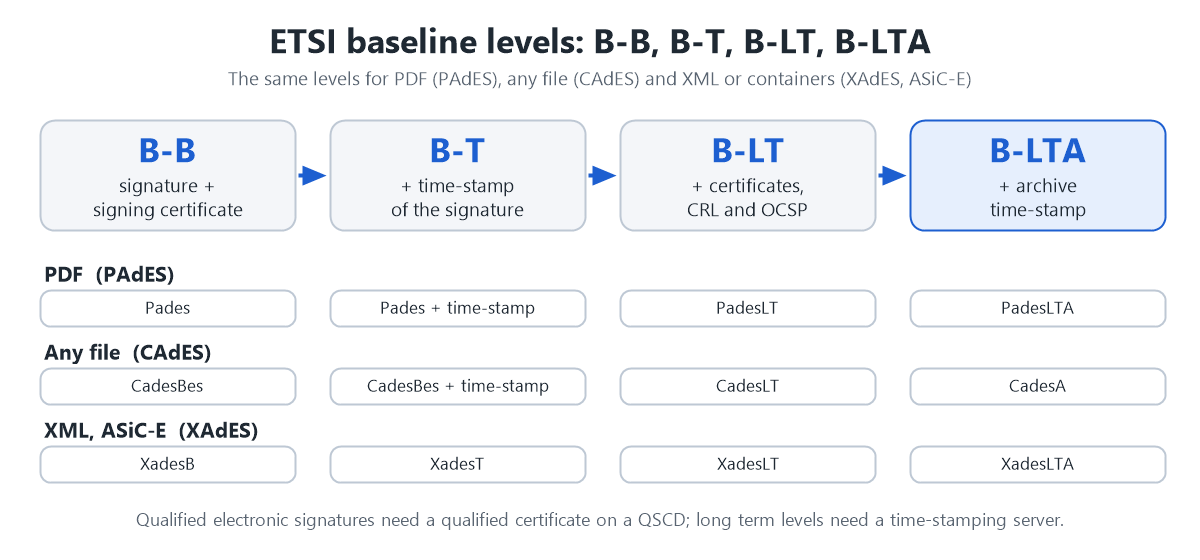
| Standard formats | PAdES (ETSI EN 319 142-1), CAdES (ETSI EN 319 122-1), XAdES (ETSI EN 319 132-1) and ASiC-E containers (ETSI EN 319 162-1), at the baseline levels B-B, B-T, B-LT and B-LTA |
| Qualified certificate and QSCD | Qualified certificates and seals on smart cards, USB tokens and HSMs, through the Windows certificate store or PKCS#11; the private key never leaves the device |
| Qualified time stamps | RFC 3161 time-stamping servers, with user name and password or TLS client certificate authentication, policy OID and SHA-256, SHA-384 or SHA-512 |
| Long term validation | Certificates, CRL and OCSP responses embedded in the signature (PAdES-LT, XAdES-LT, CAdES-LT) and archive time stamps (PAdES-LTA, XAdES-LTA, CAdES-A), with renewal of the archive time stamp |
| Verification and validation | Verification of every signature type, certificate validation (validity, CRL, OCSP) and signatures that the EU DSS validator recognizes |
| Signature policies | Explicit signature policy identifiers for PAdES, CAdES, XAdES, Office and ASiC-E signatures |
Qualified Electronic Signatures and Qualified Electronic Seals with QSCD
A qualified electronic signature (QES) is an advanced electronic signature created by a qualified signature creation device (QSCD) and based on a qualified certificate. According to Article 25 of the eIDAS Regulation it has the equivalent legal effect of a handwritten signature in all the Member States of the European Union. A qualified electronic seal is the same for a legal person (Article 35).
The library signs with the key that is stored in the QSCD. The private key stays inside the smart card, the USB token or the HSM, and the signature is created by the device. You can use:
- Smart cards and USB tokens (for example SafeNet / Thales eToken and other QSCD tokens) through the Windows certificate store (MS-CAPI, CNG, CSP, KSP) with the smart card PIN supplied by your program, so the PIN window does not interrupt a batch or a service;
- PKCS#11 devices and HSMs (Luna and other HSM, OpenSC cards, any PKCS#11 module) on Windows, Linux and macOS, with RSA and ECDSA keys;
- Remote and cloud signing: a signing service that holds the key (a remote QSCD, Azure Key Vault or Managed HSM) through the
IExternalSignatureinterface, or the two-phase signature in which your application prepares the PDF, a remote signer signs the hash and your application completes the document.
The legal level of a signature is given by the certificate and by the device, not by the software. The library creates the signature in the format that the validators expect and exposes the data that your application needs to check it: whether the certificate declares itself qualified (qcStatements), the time of the time stamp, the revocation status and the algorithms. For a qualified electronic signature, use a qualified certificate on a QSCD issued by a qualified trust service provider; advanced electronic signatures can be created with any valid X.509 certificate, including PFX files and certificates of the Windows store.
Qualified Time-Stamping Servers (RFC 3161) and Trusted Time
A qualified electronic time stamp (Article 41 of the eIDAS Regulation) has the presumption of the accuracy of the date and time it indicates and of the integrity of the data to which it is bound. Long-term signatures depend on it: the time stamp proves that the signature existed while the certificate was valid.
The library connects to any RFC 3161 time-stamping authority, including the servers of qualified trust service providers, over HTTP or HTTPS. Commercial qualified services usually require authentication, and all the methods are supported:
- user name and password (HTTP basic authentication);
- a TLS client certificate;
- the policy OID requested from the server, the nonce, the hash algorithm (SHA-256, SHA-384, SHA-512) and the time-out of the request.
Time stamps are used for the signature (B-T), for the document and for the archive (B-LTA), and for the time stamping of any file as a .TSR, .TST or .TSD file. When you read a time stamp, the library tells whether it declares itself a qualified time stamp (ETSI EN 319 422) and gives the certificate of the time-stamping authority. If you do not have a time-stamping service yet, see our Time Stamp Server (TSA).
PAdES, CAdES, XAdES and ASiC-E: Signature Formats and Baseline Levels
| Format | What you can sign | Options |
| PAdES (PDF) | PDF documents | PKCS#7 and PAdES B-B, PAdES-LT and PAdES-LTA; visible or invisible signatures; several pages and several signers; custom text, fonts, images and right-to-left text; signature fields; certification signatures; document time stamps; AES encryption; ECDSA |
| CAdES (.p7m, .p7s) | Any file: PDF, Word, images, XML, archives | CMS / PKCS#7, CAdES-BES, CAdES-T, CAdES-C, CAdES-XL, CAdES-LT, CAdES-A; attached or detached; co-signatures; signature policies |
| XAdES (XML) | XML documents (invoices, e-government messages) and, detached, any file | XAdES-B-B, B-T, B-LT and B-LTA; enveloped or detached; commitment type; signature production place; archive time-stamp renewal; XMLDSig with RSA or ECDSA |
| ASiC-E (.asice) | Several files in one signed container | XAdES signatures B-B to B-LTA; co-signatures; archive time-stamp renewal |
| Office | Word, Excel and PowerPoint documents | XAdES package signatures compatible with Microsoft Office, invisible or with a Word signature line; levels B, T and LT |
All the formats support SHA-256, SHA-384 and SHA-512, RSA and elliptic curve (ECDSA) certificates, and several signatures on the same document. The older PKCS#7 PDF signature is still available for the readers that need it.
Long Term Validation and Archiving: PAdES-LTA, XAdES-LTA, CAdES-A
A signature that must be verified in ten years cannot rely on the certification authority being online. The library embeds in the signature the certificates and the CRL and OCSP revocation data of the chain (PAdES-LT, XAdES-LT, CAdES-LT) and adds an archive time stamp (PAdES-LTA, XAdES-LTA, CAdES-A). Before the certificate of the time-stamping authority expires, the archive time stamp is renewed with one call, without the certificate of the signer, for PDF, XAdES and ASiC-E documents. A complete sample shows how to run the renewal as a scheduled task.
Digital Signature Library for C# and VB.NET: Code Samples
1. Sign a PDF in PAdES-LTA format with a qualified certificate on a smart card or a USB token, with a qualified time-stamping server:
using System;
using System.IO;
using System.Security.Cryptography.X509Certificates;
using SignLib.Certificates;
using SignLib.Pdf;

class Program
{
    static void Main()
    {
        const string serial = "YourSerialNumber";   // the serial number of the library

        // The qualified certificate on the QSCD (smart card or USB token), found by its thumbprint: no selection window.
        X509Certificate2 certificate = DigitalCertificate.LoadCertificate(true, DigitalCertificateSearchCriteria.Thumbprint, "FAC4D3EF766A59BB068DD90877267EBC56B4232A");

        // The PIN of the token is used for the next signature only.
        DigitalCertificate.SmartCardPin = Environment.GetEnvironmentVariable("TOKEN_PIN");

        PdfSignature pdf = new PdfSignature(serial);
        pdf.LoadPdfDocument("contract.pdf");
        pdf.DigitalSignatureCertificate = certificate;

        pdf.SignatureStandard = PdfSignatureStandard.PadesLTA;       // PAdES-B-LTA
        pdf.PadesLtvLevel = PadesLtvLevel.IncludeCrlAndOcsp;          // embed the CRL and OCSP responses

        // The qualified time-stamping server (RFC 3161), with user name and password.
        pdf.TimeStamping.ServerUrl = new Uri("https://tsa.example.com/rfc3161");
        pdf.TimeStamping.UserName = "account";
        pdf.TimeStamping.Password = "secret";

        File.WriteAllBytes("contract[signed].pdf", pdf.ApplyDigitalSignature());
    }
}
2. Verify the signatures and the time stamps of a PDF document:
PdfSignature check = new PdfSignature(serial);
check.LoadPdfDocument(File.ReadAllBytes("contract[signed].pdf"));

foreach (PdfSignatureInfo info in check.DocumentProperties.DigitalSignatures)
{
    Console.WriteLine(info.SignatureName + " (" + info.SignatureType + ")");
    Console.WriteLine("  signer: " + info.SignatureCertificate.Subject);
    Console.WriteLine("  intact: " + info.SignatureIsValid + ", time: " + info.SignatureTime);
    Console.WriteLine("  qualified time-stamp: " + (info.SignatureIsTimestamped && info.TimestampInfo.IsQualifiedTimestamp));
}
3. Sign several files in an ASiC-E container (XAdES-LTA) with a time-stamping server that requires a TLS client certificate:
// using SignLib.Asic; using SignLib.Xml;
AsicSignature asic = new AsicSignature(serial);
asic.DigitalSignatureCertificate = certificate;
asic.SignatureStandard = XadesSignatureStandard.XadesLTA;
asic.LtvLevel = XadesLtvLevel.IncludeCrlAndOcsp;

asic.TimeStamping.ServerUrl = new Uri("https://tsa.example.com/rfc3161");
asic.TimeStamping.AuthenticationCertificate = DigitalCertificate.LoadCertificate("tsa-client.pfx", "password");

asic.CreateContainer(new[] { "invoice.xml", "annex.pdf" }, "invoice.asice");

// Renew the archive time-stamp years later, without the certificate of the signer.
asic.AddArchiveTimestamp("invoice.asice", "invoice[renewed].asice");
More than 40 complete sample projects (C#, VB.NET, PowerShell, Windows Forms and an ASP.NET Core signing web service) are included in the download. See the Code Samples page and the Programmer’s Manual.
More Features of the .NET Signature Library
 PDF signatures – visible and invisible signatures, signature on a chosen page, on several pages or on all pages, several signers, custom signature text, fonts, images and right-to-left text, existing signature fields, certification signatures (DocMDP), PDF encryption with passwords or certificates (AES-128), PDF merging and text and image insertion, signature of a PDF loaded from a web address.
 Certificates – certificates from PFX files, from the Windows store (current user or local machine) and from smart cards; selection by thumbprint, serial number or name; certificate validation with the validity period, CRL (HTTP and LDAP) and OCSP; reading of the key usages and of the qcStatements extension; an X.509 certificate generator for root, issued, self-signed, ECDSA and CSR-based certificates, also with qualified certificate statements for tests.
 For developers – documents processed in memory (byte arrays and streams, no temporary files), thread-safe usage with one signature object per thread, batch and parallel signing, signing without user intervention for services and scheduled tasks, an ASP.NET Core signing web service sample with two-phase signing, detailed exceptions, and XML documentation for IntelliSense.
Use Cases
- E-invoicing and e-government: XAdES and ASiC-E signatures for portals and e-delivery systems that require ETSI formats;
- Contracts and official documents: PAdES signatures with qualified certificates and qualified time stamps, signed in your web application or document management system;
- Long term archives: PAdES-LTA, XAdES-LTA and CAdES-A with scheduled renewal of the archive time stamp;
- Electronic seals of organizations: documents sealed automatically by a service with an HSM or a remote qualified seal;
- Signing platforms and SaaS: server-side signing, remote signing and two-phase signing in which the signer holds the key;
- Banking, insurance, healthcare, notaries and public procurement: batch signing of thousands of documents and verification of the signatures received.
Platforms and Requirements
.NET versions: .NET 8, .NET 9, .NET 10 and .NET Framework 4.6.2 and 4.8 (builds for each target framework are included).
 Operating systems: Windows, Linux and macOS, depending on the .NET runtime. The signing and verification code is 100% managed; the Windows certificate store, the smart card PIN bypass of the Windows drivers and the Word signature lines are available on Windows, and PKCS#11 and PFX certificates work on every platform. Because the code is managed, it can be deployed in Docker containers and in cloud services.
Programming languages: C#, VB.NET, ASP.NET, Visual C++ and Windows PowerShell (ready-to-use scripts are included). Adobe Acrobat or Microsoft Office are not needed to create or verify the signatures.
 Licensing: eIDAS Signature Library .NET can be used by companies, freelancers and software vendors who develop software for third parties or for internal use. The license is a lifetime license with no monthly or annual fees and no fees per signature or per server. When a new version is released you can continue using your purchased version. The source code of the entire library (C#, 100% managed code written in Visual Studio) is included with your purchase.
 Technical support and updates are free for 12 months after purchase. If you need help with our software, please contact us to receive prompt assistance from our technical support team. We offer free before-and-after purchase technical support. Email response time is usually less than 24 hours.
 60 Day Money Back Guarantee – If you are not pleased with our software for any reason, you are entitled to our 60 day no hassle, no questions asked, money back guarantee.
Buy eIDAS Signature Library .NET
| License Type | Price (EUR) | Buy with PayPal | Buy with credit card |
| Full License (source code included, unlimited developers, high priority support) |
190 EUR Lifetime License |
 |
|
| Technical Support |
Technical support is free for 12 months after purchase. Typical response time is within 6 hours. Purchase Upgrade and Support package. |
||
Download eIDAS Signature Library .NET with Visual Studio Sample Projects
(latest version: 8.0)
 If you are interested in our eIDAS Signature Library .NET or you need any customization, please request a quote.
Frequently Asked Questions
Which .NET library creates eIDAS-compliant digital signatures?
eIDAS Signature Library .NET creates PAdES (PDF), CAdES (.p7m, .p7s), XAdES (XML) and ASiC-E signatures at the baseline levels B-B, B-T, B-LT and B-LTA defined by ETSI EN 319 142-1, 122-1, 132-1 and 162-1. It signs with qualified certificates and seals on a QSCD and uses RFC 3161 time-stamping servers, including qualified ones.
Can I sign with a qualified certificate on a smart card, USB token or HSM in C#?
Yes. The certificate is found in the Windows certificate store, with the PIN supplied by your program or typed by the user, or the key is used through a PKCS#11 module. The private key never leaves the device. Remote QSCD and cloud signing services are supported through the IExternalSignature interface and the two-phase PDF signature.
Does the library support qualified time-stamping servers?
Yes. Any RFC 3161 time-stamping server can be used over HTTP or HTTPS, with user name and password or a TLS client certificate, an optional policy OID, and SHA-256, SHA-384 or SHA-512. The library can tell whether a time stamp declares itself qualified.
What is the difference between PAdES-B-B, PAdES-LT and PAdES-LTA?
PAdES-B-B is the basic signature. With a time stamp it becomes B-T. PAdES-LT adds the certificates and the CRL and OCSP responses, so the signature can be validated after the certificate expires. PAdES-LTA adds an archive (document) time stamp for the long term, and the time stamp can be renewed periodically. The same levels exist for CAdES and XAdES.
Is a signature created with the library a qualified electronic signature?
The library creates the signature in the correct format. It is a qualified electronic signature when it is created with a qualified certificate on a QSCD issued by a qualified trust service provider. The qualification comes from the certificate and the device, and it is confirmed by a validator that uses the EU Trusted Lists.
How can I validate the signatures?
With the library itself (the verification methods and the certificate validation) and with the EU DSS validation tool, which reports the signature level, the indication and the details of every check against the EU Trusted Lists.
Does it run on Linux, macOS, Docker and Azure?
Yes, on every platform supported by .NET 8, 9 and 10. Use PFX files, PKCS#11 or a remote signing service on Linux and macOS. The Windows certificate store and the Word signature lines need Windows.
Can I sign PDF documents in an ASP.NET Core web application?
Yes. The documents are processed in memory (byte arrays and streams) without temporary files. A sample ASP.NET Core signing web service with client and two-phase signing is included.
Is the source code included and what does the license allow?
The complete C# source code is included. The lifetime license allows unlimited developers and the use in your own products and in software that you deliver to your customers, with no royalties and no fees per use. Updates and technical support are free for 12 months.
Useful links:
- C# Code Samples
- PDF Signer (PAdES)
- XML Signer (XAdES)
- P7S Signer (P7M and CAdES)
- Time Stamp Server (TSA)
- Digital Certificates
- Digital Signature in PowerShell
- Upgrade and Support
The information about the eIDAS Regulation is a simplified explanation and it is not legal advice. Microsoft, .NET, Windows, Azure and Visual Studio are trademarks of Microsoft Corporation. Adobe is a trademark of Adobe Inc.