 Download Digital Certificate Generator (Free Demo)
Digital Certificate Generator is a Windows application that creates digital certificates in a few clicks: PFX files, certificates signed by your own root certificate, certificates for a CSR (SSL / TLS web servers) and certificates generated directly on a smart card or a USB token. You choose the subject, the validity, the RSA, DSA or elliptic curve (ECDSA) key, the hash algorithm and every extension, without any command line and without buying or installing any other software. The same certificates can be issued from your own code in C#, VB.NET or PowerShell, with the Signature Library that the program is built on.
Lifetime license 19 EUR – Unlimited number of certificates – 60 day money back guarantee. See the price and buy.
Create Digital Certificates for Tests, Development and Internal Use
A digital certificate links a name to a public key and it is needed to sign documents, e-mails and programs, to log on with a smart card and to protect a web site with HTTPS. Buying a certificate from a certification authority takes time and money, and it is not necessary when you develop an application, when you test a signing process, when you train users or when you build an internal system. Digital Certificate Generator gives you the certificate you need, in seconds, with the exact options that your application requires. It contains two programs:
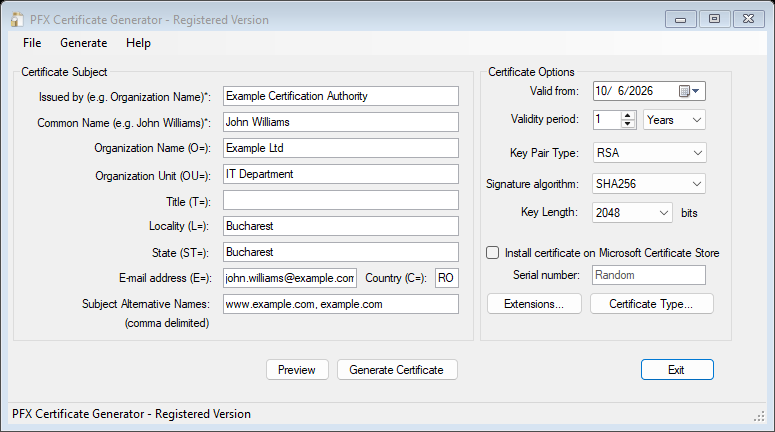
PFX Certificate Generator – issues certificates saved in PFX files (certificate and private key protected by a password), self-signed or signed by a root certificate, and signs the CSR requests of your web servers.
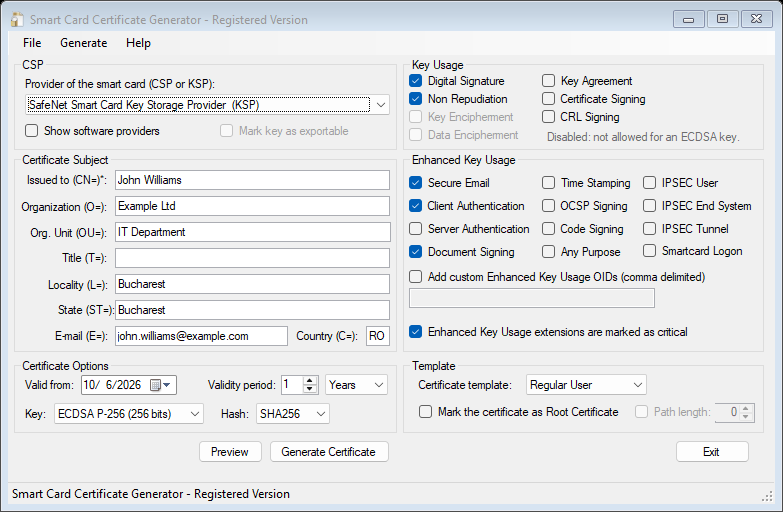
Smart Card Certificate Generator – generates the key pair on the smart card, the USB token or the Windows provider that you select, and installs the certificate or creates the request for your certification authority.
Benefits:
– Generate PFX certificates, self-signed or signed by your own root certificate
– Issue certificates directly on smart cards and USB tokens (CSP and KSP providers)
– Create certificate requests (CSR) on a device, and install the answer of the certification authority
– Sign the CSR of a web server and obtain an SSL / TLS certificate with several alternative names
– Issue certificates from C#, VB.NET and PowerShell with the X509CertificateGenerator class
– RSA, DSA and Elliptic Curve (ECDSA) keys; SHA-256, SHA-384, SHA-512
– Templates for users, SSL servers, root authorities, time stamping and code signing
– Custom subject, alternative names (DNS, IP, e-mail, URI), serial number, key usages and enhanced key usages
– Install the certificate in the Windows store with one click
– Unlimited number of certificates, no monthly fees, no Internet connection needed
Features
 Certificates on Smart Cards and Hardware Devices – Smart Card Certificate Generator creates the private key inside the device: the key never leaves the smart card or the token, so nobody can copy it. It works with the cryptographic providers of Windows, both the classic CSP (CryptoAPI) and the modern KSP (Key Storage Provider) of the smart card driver. The program lists the keys that your device supports (RSA, and ECDSA P-256, P-384 and P-521 when the card allows them), generates the key, installs a self-signed certificate on the card, or creates a CSR and installs the certificate that the certification authority returns (DER, PEM or PKCS#7 files). It was tested with SafeNet smart cards and tokens. The key and the PIN are handled by Windows and by the driver of the device.
 PFX Certificates, Root Certificates and Your Own Certification Authority – Issue a certificate signed by a root created on the fly, a self-signed certificate, or a certificate signed by your own root that you load from a PFX file. With one root you can issue the certificates of a whole organization (employees, servers, devices) and install the root only once on the computers that must trust them. Root certificates can have a limited path length. The public part of any certificate (.cer, DER or PEM) can be exported from the program.
 Certificates for CSR Requests (SSL / TLS) – Sign the Certificate Signing Request generated by IIS, OpenSSL, Linux web servers, network devices or your own application with a root certificate, and install the answer on the web server. The names of the site are written as Subject Alternative Names, so the browsers accept the certificate. The request is verified before it is signed.
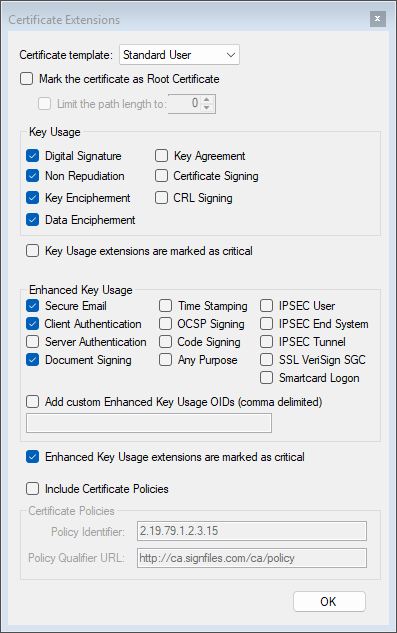
Key Usage, Enhanced Key Usage and Templates – Choose what the certificate can be used for: digital signature, non repudiation, key encipherment, certificate signing, server and client authentication, secure e-mail, document signing, code signing, time stamping, smart card logon, or any custom OID, with the critical flag where it is needed. The ready-made templates (Standard User, SSL Certificate, Root Certificate, Time Stamping, Code Signing) set everything for you. A time stamping certificate that meets the requirements of a time stamp server (RSA 2048, Time Stamping as the only critical enhanced key usage) is created with one click, and so is a code signing certificate for EXE, DLL, MSI and PowerShell files. The program disables the key usages that an ECDSA or a DSA key cannot have, so the certificate is always correct.
RSA, DSA and Elliptic Curve Keys – RSA keys of 2048, 4096 and 8192 bits, DSA keys of 1024, 2048 and 3072 bits, and ECDSA keys on the NIST P-256, P-384, P-521 and Brainpool curves. The keys are generated on your computer. The hash of the signature can be SHA-256, SHA-384 or SHA-512 (SHA-1 for the old systems that still need it).
Subject, Alternative Names and Serial Number – The subject has all the usual attributes (CN, O, OU, C, ST, L, E, T) and accepts Unicode characters and commas. The alternative names can be DNS names, IP addresses, e-mail addresses and URIs, written in a single field. You can set the serial number or let the program generate a random one, and the certificate receives a friendly name from its common name, so it is easy to find in the Windows store.
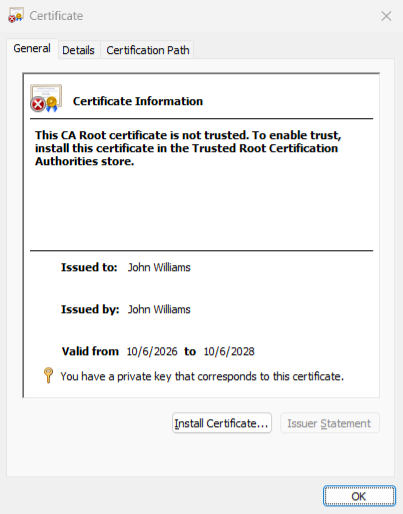
Install and Trust in Windows – With one checkbox the certificate is installed in the Personal store of the current user, together with its private key, and the root certificate is added to the trusted roots. A Preview shows the certificate in the Windows viewer before anything is saved, and the PFX information window exports the public part and shows who issued the certificate.
The Same Certificates From Your Code – Everything that the program does is available to developers in the X509CertificateGenerator class of the Signature Library: self-signed and root certificates, certificates issued by your own CA, certificates for a CSR, ECDSA and DSA keys, extensions, certificate policies, revocation addresses. The user manual contains complete, tested examples in C#, VB.NET and PowerShell, and shows how to create keys and CSRs with the Windows tools (certreq, certutil, PowerShell and CertEnroll) and how to link a certificate to its private key.
X509CertificateGenerator generator = new X509CertificateGenerator("serial number");
generator.Subject = "CN=John Smith, O=Example Ltd, C=RO";
generator.ValidTo = DateTime.Now.AddYears(2);
generator.KeyAlgorithm = KeyAlgorithm.ECDSA;
generator.EllipticCurve = EllipticCurve.NistP256;
generator.Extensions.AddKeyUsage(CertificateKeyUsage.DigitalSignature);

byte[] pfx = generator.GenerateCertificate("123456");   // the PFX file, as bytes
File.WriteAllBytes("john.pfx", pfx);
Where Digital Certificate Generator Is Used
– Certificates for the development and the test of applications that sign, encrypt or authenticate
– SSL / TLS certificates for development and internal web sites, signed by your own root
– A small internal certification authority for employees, servers and devices
– Time stamping certificates for a time stamp server, and code signing certificates for your programs
– Generating the keys of a smart card or a USB token, and certificate requests for your certification authority
– Training, demonstrations and the preparation of the tests of a signing or a PKI system
A certificate that you issue yourself is trusted only by the computers on which you install your root certificate. For a certificate that other persons and organizations must trust automatically, use a certificate issued by a public certification authority.
Frequently Asked Questions
Can I use the certificates to sign documents, e-mails and programs?
Yes. A PFX certificate can be used by any program that signs with a certificate: Adobe Acrobat, Microsoft Office, mail clients, code signing tools and our own signing products. The signatures are verified as trusted on the computers where your root certificate is installed.
Can it generate the certificate directly on my smart card or USB token?
Yes. Smart Card Certificate Generator creates the key on the device, through its CSP or KSP provider, and installs a self-signed certificate or the certificate returned by your certification authority. The private key cannot be exported from the device.
Can I sign a CSR generated by IIS or OpenSSL?
Yes. Load your root certificate, select Generate from CSR and select the request. The program writes the certificate that you install on the server.
Can I issue certificates from my own application or script?
Yes. Use the X509CertificateGenerator class of the Signature Library from C#, VB.NET or Windows PowerShell. The manual has complete examples.
Which key types and algorithms are supported?
RSA (up to 8192 bits), DSA and ECDSA (NIST P-256, P-384, P-521 and Brainpool), with SHA-256, SHA-384 and SHA-512.
Is there a limit for the number of certificates?
No. The license allows an unlimited number of certificates. The demo version limits the validity of a certificate to 30 days.
Are my keys sent anywhere?
No. The certificates and the keys are created on your computer, or inside your smart card. The program does not need an Internet connection.
Digital Certificate Generator Requirements:
– Microsoft .NET Framework 4.6.2 (included in Windows 10 and Windows 11)
– Windows 10 or later (including Windows 11 and Windows Server 2025)
– For smart cards and USB tokens: the driver of the device installed
 Licensing:
The license for Digital Certificate Generator is a lifetime license. There is no additional cost like monthly / annual fees or fees per use. When a new version is released you can continue using your purchased version as usual. The product can be used to issue an unlimited number of certificates.
 The technical support and updates are free for 12 months after purchase. If you need help with our software, please contact us to receive prompt assistance from our technical support team. We offer free before-and-after purchase technical support for our programs. Technical support is provided by email only. Email response time is usually less than 24 hours.
 60 Day Money Back Guarantee – If you are not pleased with our software for any reason, you are entitled to our 60 day no hassle, no questions asked, money back guarantee.
Buy Digital Certificate Generator
| Product | Price (€) | Buy with PayPal | Buy with credit card | |
| Digital Certificate Generator |
19 EUR Lifetime License |
 |
||
| Technical Support | The technical support is free for 12 months after purchase | |||
Download Digital Certificate Generator (Free Demo)
(latest version: 5.0)
Useful links:
